

SQL Server Health Check

Disable Unnecessary SQL Server Instances And Services

Updated October 29, 20251 min read

Why should you care about services that are not needed?

You may be wasting your precious resources on unused services.

It would be best if you prioritized your more critical SQL Server instance to use more resources and did not allow less important ones to take all of them.

How can I list all the SQL Server instances and services?

  1. Click Start and search for “configuration”.
  2. Open SQL Server Configuration Manager and choose SQL Server Services.
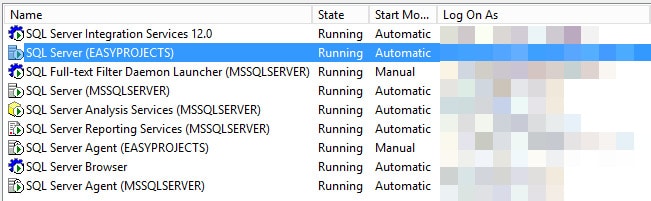
Figure 1 – SQL Server configuration manager.
Figure 1 – SQL Server Configuration Manager

Also, you can list all instances installed using the T-SQL code below.

EXEC master.sys.xp_regread @rootkey = 'HKEY_LOCAL_MACHINE'
	,@key = 'SOFTWARE\Microsoft\Microsoft SQL Server'
	,@value_name = 'InstalledInstances'

How can you fix them?

  1. Disable the SQL Server instances and services that are not used.
  2. Adjust the max memory, the threshold to parallelism, and MAXDOP settings for all instances appropriately.


Discover More

Discover what clients are saying about Red9

Red9 has incredible expertise both in SQL migration and performance tuning.

The single biggest benefit has been performance gains and tuning associated with migrating to AWS and a newer version of SQL Server with Always On clustering. Red9 was an integral part of this process.… The deep level of knowledge of MSSQL is incredible and the combined experience and expertise has been a huge asset.… Red9 was able to find a number of inefficient indexes and performance bottlenecks that resulted in over 400% improvement in latency.

Rich StaatsRich StaatsCloud EngineerMetalToad
See more testimonials